Search this Blog

Tuesday, August 11, 2020

Setting HomeFolder for Bulk Users in Active Directory

Hi All, how to add home folders for multiple users in active directory? here is a solution, go through this article and this powershell script will help you to add home folder and map it to a fileshare, this would be very much useful for sys admins who wants to add/modify home folder for number of users with one go.

Below the link to the script and few screen shots of script output.

Link to Script:- AddHomeFolderBulkUsers


Bulk User Creation with PowerShell

Hi All, this time we are going to create bulk users with powershell, there might be a requirement for system admins where we need to create a bunch of users, creating one by one via GUI is a daunting task, this powershell script will create users in few minutes, create a .csv file with list of information about users, key in the same in script and execute, in few minutes you have users ready in active directory.

Links for the script:- https://github.com/snagaraj85/PowerShellBulkUserCreation

Below screenshot of csv file


Monday, June 24, 2019

Active Directory User Lookup Tool

Hi All, this time I'm posting a handy tool made with PowerShell to lookup an user in active directory, this handy tool will fetch you the details such as user's account expiration date,email,password expiry status, lockout status,display name, OU path,last log on date,user principal name, account enable status etc.,Below the link to the script.


 Link to script:- ADUserLookupTool

Monday, June 03, 2019

Powershell Module to get local & remote system's disk space details

This handy PowerShell module helps us to get the disk space details of the local system as well the remote system. The script queries the WMI object and get the logical disks space details of each partitions. It lists the full details such as total volume size of the partition, drive letter, used space, free space as well the free space details in terms of percentage which will be very much useful. This wonderful module will assist to get the disk space details without logging to remote system.
And one more important thing is, if the computer parameter for remote system is not specified it defaults to the local system's disk details.
Usage: - Get-DiskSpace -Computer SERVER1
             Get-DiskSpace

Link to the script: Get-DiskSpace


Friday, June 08, 2018

PowerShell GUI Based Disk_Space_Viewer


A basic GUI based script to find the disk space of the given system, this script shows the details of the total volume size, utilized space, free space as well free space in percentage. Key in the computer name to find the disk space details if none entered the script shows the local system's disk space details, hope you enjoy and utilize this handy useful powershell script to check or monitor disk space of the local or remote system. Below the GUI view and the link for code.


Disk_Space_Viewer

Monday, April 09, 2018

Script to perform day to day Active Directory Tasks

Hi All, Below script can be used to perform day to day AD Tasks which are mentioned below in the image, also i shared the link for code...Feel free to use it & add your comments...:)


Link for the script:- AD-Management-Tasks


Tuesday, December 22, 2015

Exchange PowerShell Commands

Exchange Powershell command to get the details of a mailbox

[PS] C:\Users\sysadmin\Desktop>Get-Mailbox -Identity "Nagarajan S" | For
mat-List Name,Database,UseDatabaseQuotaDefaults,IssueWarningQuota,ProhibitSendRe
ceiveQuota,MaxSendSize,MaxReceiveSize,RecipientLimits,PrimarySmtpAddress,Organiz
ationalUnit,RecipientType,ServerName


Command to get Mail Forwarding Enabled Users

Get-Mailbox -Filter {ForwardingAddress -ne $null} | ft Name,ForwardingAddress,DeliverToMailboxAndForward -Autosize


Forefront Powershell command to get blocked email of a user

PS C:\Program Files (x86)\Microsoft Forefront Protection for Exchange Server>Get-FseQuarantine | Where-Object {$_.RecipientAddresses -eq "s.nagarajan@testdomain.com"} | Select-object -property "SenderName","SenderAddress","Subject","DetectionTime","IncidentCategory","IncidentName","RecipientNames" 


To get the mailbox size of the users in an OU

get-mailbox -OrganizationalUnit "ou=IT,ou=Users,dc=testdomain,dc=net" -resultsize unlimited | get-mailboxstatistics | ft DisplayName,TotalItemSize,Itemcount


Setting mail enabled security group to restrict mail delivery to DL

Set-DistributionGroup Test-ChennaiDL -AcceptMessagesOnlyFromDLMembers "ALL_MAIL SENDERS" 


Sunday, June 03, 2012

Step by Step Configuring SAN storage in Windows 2003 Server using MS iSCSI Initiator


Step by Step Configuring SAN storage in Windows 2003 Server using MS iSCSI Initiator
1. Download MS iSCSI Initiator from Microsoft site.
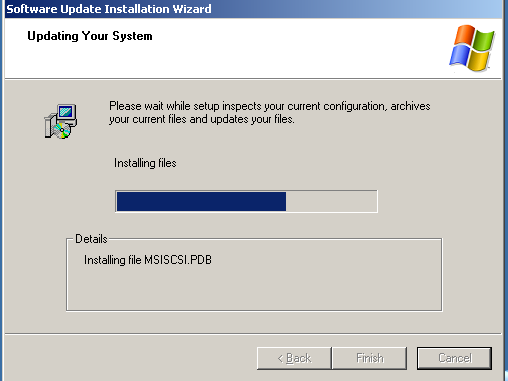
2. Install MS iSCSI Initiator as shown  below.


Monday, May 28, 2012

Step by Step Configuring Openfiler Storage

Openfiler is an operating system that provides file-based network-attached storage and block-based storage area network.It is free software licensed under the GNU General Public License.

Here i will show how you can setup a SAN storage using Openfiler to use with VMware Workstation.

  1. Install Openfiler as a separate VM.
  2. Once successfully installed the Openfiler you will get the screen below. 
3. Once Openfiler is installed access the web interface of the openfiler as shown below from other VM.(ex: https://192.168.1.25:446)
 4. Before this ensure the httpd service and openfiler service is running, if not start those services by running the following commands.
 
5. Run the below commands to make those services started after every restart.
 
6. Login to the openfiler with the default username &  password which is username as ‘openfiler’ and password as ‘password’.
7. Click on the Volumes tab to see the physical disks attached to the openfiler.

8. Click on the /dev/sda to create a physical volume and then click on the Create button to create a physical volume of 6 GB as shown below in example.This will create a physical volume of 6 GB.
9. Now we have to create a volume group to be used for our storage. Click on the Volumes tab and then select ‘Volume Groups’ from the ‘Volume section’ menu on the right hand side.you will get the screen like below.


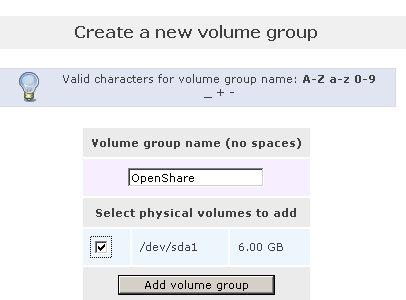
10. Enter a namein volume group name in text box provided and select the physical volume to be added by selecting the checkbox and click the ‘Add volume group’ Button.
11. Once done you will get the screen like below.


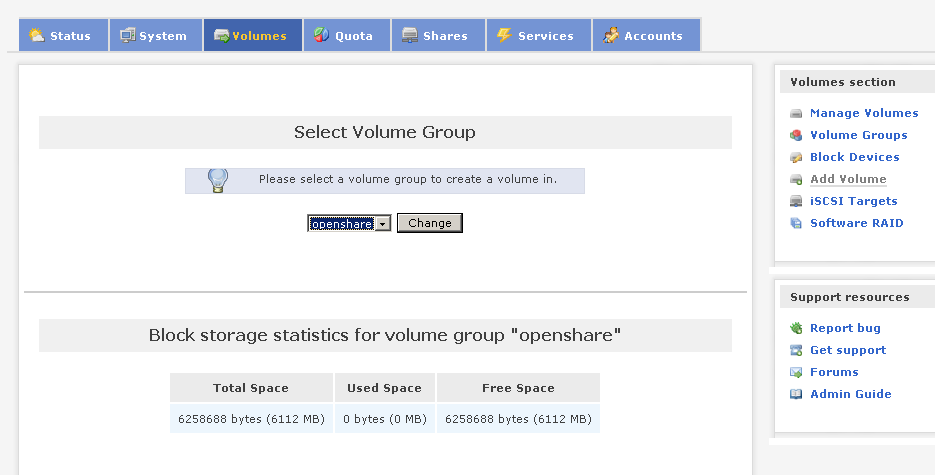
12. Now we have to create a volume from the volume group. Click the Volumes tab and select the ‘Add Volume’ on the right side of the menu.This wil bring you the screen as shown below. Select the Volume which was created in the previous step

13. Click on the Change button and you will get the screen below. Enter a volume name and a volume description & enter the size by inputting the required size or use the sliding bar to mention the size of the volume and select the Filesystem /Volume type as ‘iSCSI’.
14. Click on the Create button to create the volume in the volume group, in this example i utilized the entire 6 GB space to create volume and you will be presented with the screen below.

15. Now we had setup the volume in openfiler to be used for the network/hosts. Click on the Services tab and enable the ‘iSCSI Target  Server’ as shown below by clicking the ‘enable’ button.


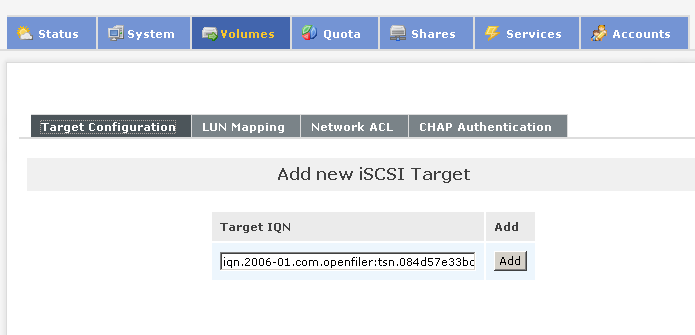
16. Now add the iSCSI Target by going to the Volumes tab and select the ‘iSCSI Targets’ from the right side menu and you will get the screen below. Click on the Add button to create a iSCSI Target in the Target Configuration tab

17. Once done click the LUN Mapping tab.Now we have to map the LUN by clicking the ‘Map’ button as shown below.


18. Now we have to setup the storage to be available for a single host or network by going to the Systems tab and selecting the ‘Network Access Configuration’.Here enter the ip address of the host from where you want to access the openfiler or enter the subnet address which the openfiler has to to accept the traffic. Enter a name for the storage and ensure the type is selected as ‘share’ and click the Update button.

19. Now go to the Volumes tab and select ‘Network ACL’.Here we can found the storage which we created in the previous step. Select ‘Allow’ from the access drop down list and click Update button as this will allow the iSCSI Target to be accessed by the host or the subnet which we setup earlier.


20. That’s it…Now we have successfully created a Openfiler SAN Storage for VMware ESX/ESXi .

Monday, June 27, 2011

Windows 2003 Interview Questions-2

How do you double-boot a Win 2003 server box? The Boot.ini file is set as read-only, system, and hidden to prevent unwanted editing. To change the Boot.ini timeout and default settings, use the System option in Control Panel from the Advanced tab and select Startup.

What do you do if earlier application doesn’t run on Windows Server 2003? When an application that ran on an earlier legacy version of Windows cannot be loaded during the setup function or if it later malfunctions, you must run the compatibility mode function. This is accomplished by right-clicking the application or setup program and selecting Properties –> Compatibility –> selecting the previously supported operating system.

If you uninstall Windows Server 2003, which operating systems can you revert to? Win ME, Win 98, 2000, XP. Note, however, that you cannot upgrade from ME and 98 to Windows Server 2003.

How do you get to Internet Firewall settings? Start –> Control Panel –> Network and Internet Connections –> Network Connections.

What are the Windows Server 2003 keyboard shortcuts? Winkey opens or closes the Start menu. Winkey + BREAK displays the System Properties dialog box. Winkey + TAB moves the focus to the next application in the taskbar. Winkey + SHIFT + TAB moves the focus to the previous application in the taskbar. Winkey + B moves the focus to the notification area. Winkey + D shows the desktop. Winkey + E opens Windows Explorer showing My Computer. Winkey + F opens the Search panel. Winkey + CTRL + F opens the Search panel with Search for Computers module selected. Winkey + F1 opens Help. Winkey + M minimizes all. Winkey + SHIFT+ M undoes minimization. Winkey + R opens Run dialog. Winkey + U opens the Utility Manager. Winkey + L locks the computer.

What is Active Directory? Active Directory is a network-based object store and service that locates and manages resources, and makes these resources available to authorized users and groups. An underlying principle of the Active Directory is that everything is considered an object—people, servers, workstations, printers, documents, and devices. Each object has certain attributes and its own security access control list (ACL).

Where are the Windows NT Primary Domain Controller (PDC) and its Backup Domain Controller (BDC) in Server 2003? The Active Directory replaces them. Now all domain controllers share a multimaster peer-to-peer read and write relationship that hosts copies of the Active Directory.

How long does it take for security changes to be replicated among the domain controllers? Security-related modifications are replicated within a site immediately. These changes include account and individual user lockout policies, changes to password policies, changes to computer account passwords,

and modifications to the Local Security Authority (LSA).

What’s new in Windows Server 2003 regarding the DNS management? When DC promotion occurs with an existing forest, the Active Directory Installation Wizard contacts an existing DC to update the directory and replicate from the DC the required portions of the directory. If the wizard fails to locate a DC, it performs debugging and reports what caused the failure and how to fix the problem. In order to be located on a network, every DC must register in DNS DC locator DNS records. The Active Directory Installation Wizard verifies a proper configuration of the DNS infrastructure. All DNS configuration debugging and reporting activity is done with the Active Directory Installation Wizard.

When should you create a forest? Organizations that operate on radically different bases may require separate trees with distinct namespaces. Unique trade or brand names often give rise to separate DNS identities. Organizations merge or are acquired and naming continuity is desired. Organizations form

partnerships and joint ventures. While access to common resources is desired, a separately defined tree can enforce more direct administrative and security restrictions.

How can you authenticate between forests? Four types of authentication are used across forests: (1) Kerberos and NTLM network logon for remote access to a server in another forest; (2) Kerberos and NTLM interactive logon for physical logon outside the user‘s home forest; (3) Kerberos delegation to N-tier application in another forest; and (4) user principal name (UPN) credentials.

What snap-in administrative tools are available for Active Directory? Active Directory Domains and Trusts Manager, Active Directory Sites and Services Manager, Active Directory Users and Group Manager, Active Directory Replication (optional, available from the Resource Kit), Active Directory Schema Manager (optional, available from adminpak)

What types of classes exist in Windows Server 2003 Active Directory?

Structural class. The structural class is important to the system administrator in that it is the only type from which new Active Directory objects are created. Structural classes are developed from either the

modification of an existing structural type or the use of one or more abstract classes.

Abstract class. Abstract classes are so named because they take the form of templates that actually create other templates (abstracts) and structural and auxiliary classes. Think of abstract classes as frameworks for the defining objects.

Auxiliary class. The auxiliary class is a list of attributes. Rather than apply numerous attributes when creating a structural class, it provides a streamlined alternative by applying a combination of attributes with a single include action.

88 class. The 88 class includes object classes defined prior to 1993, when the 1988 X.500 specification was adopted. This type does not use the structural, abstract, and auxiliary definitions, nor is it in common use for the development of objects in Windows Server 2003 environments.

How do you delete a lingering object? Windows Server 2003 provides a command called Repadmin that provides the ability to delete lingering objects in the Active Directory.

What is Global Catalog? The Global Catalog authenticates network user logons and fields inquiries about objects across a forest or tree. Every domain has at least one GC that is hosted on a domain controller. In Windows 2000, there was typically one GC on every site in order to prevent user logon failures

across the network.

How is user account security established in Windows Server 2003? When an account is created, it is given a unique access number known as a security identifier (SID). Every group to which the user belongs has an associated SID. The user and related group SIDs together form the user account‘s security token, which determines access levels to objects throughout the system and network. SIDs from the security token are mapped to the access control list (ACL) of any object the user attempts to access.

If I delete a user and then create a new account with the same username and password, would the SID and permissions stay the same? No. If you delete a user account and attempt to recreate it with the same user name and password, the SID will be different.

What do you do with secure sign-ons in an organization with many roaming users? Credential Management feature of Windows Server 2003 provides a consistent single sign-on experience for users. This can be useful for roaming users who move between computer systems. The Credential Management feature provides a secure store of user credentials that includes passwords and X.509 certificates.

Anything special you should do when adding a user that has a Mac? "Save password as encrypted clear text" must be selected on User Properties Account Tab Options, since the Macs only store their passwords that way.

What remote access options does Windows Server 2003 support? Dial-in, VPN, dial-in with callback.

Where are the documents and settings for the roaming profile stored? All the documents and environmental settings for the roaming user are stored locally on the system, and, when the user logs off, all changes to the locally stored profile are copied to the shared server folder. Therefore, the first time a roaming user logs on to a new system the logon process may take some time, depending on how large his profile folder is.

Where are the settings for all the users stored on a given machine? \Document and Settings\All Users

What languages can you use for log-on scripts? JavaScipt, VBScript, DOS batch files (.com, .bat, or even .exe)